Administration: Smart Quote Attributes
Attributes are the core variables of a Smart Quote configuration. They store user selections (e.g., Frame Color, Bolt Length) or calculated values (e.g., Total Surface Area) that drive the behavior of rules and the final Bill of Materials.
Attribute Types
- SELECTED: These are inputs provided directly by the user during the configuration process.
- GENERATED: These are calculated or assigned by Rules. For example, a "Shipping Weight" attribute might be generated by summing the weights of all selected components.
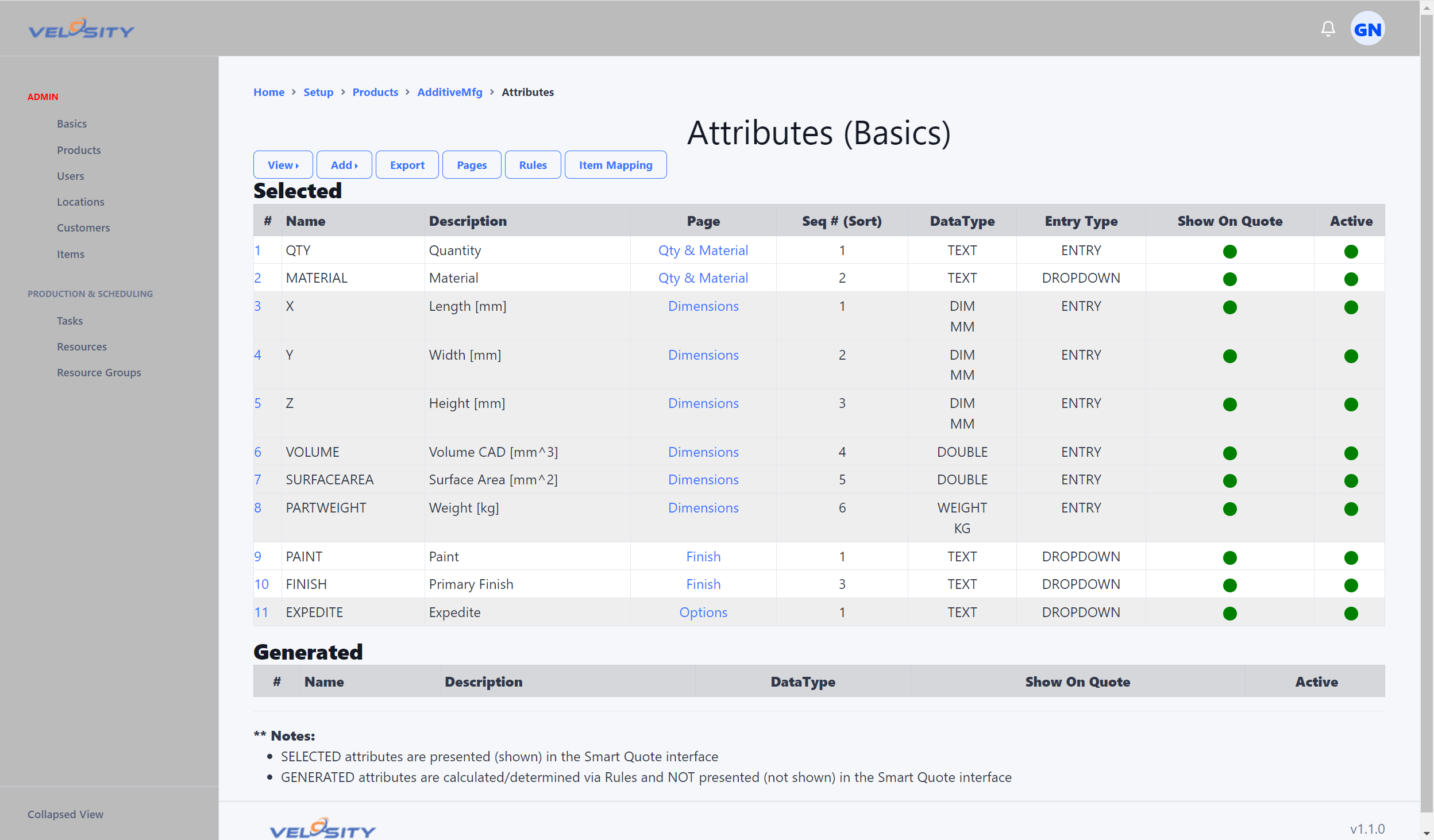 (The Attribute List view provides a summary of all variables used in a product configuration)
Valid Values and Dynamic Queries
While simple attributes use a fixed list of values (e.g., Red, Blue, Green), many configurations require dynamic data from the Velosity database.
SQL Queries for Dynamic Lists
You can populate attribute dropdowns by querying the Items Catalog. This ensures that the Sales Rep can only select materials or components that actually exist in your inventory.
Example: Retrieving items from a specific category This query fetches all item numbers from the 'Panels' category to populate a dropdown.
<queries>
    <valuesvalid attribute="PANELNUMBER">
        <sql>
            SELECT Number AS PANELNUMBER
            FROM catalog_items
            WHERE
            Category='Panels'
            AND InstanceID=?paramInstanceID
            ORDER BY Number ASC;
        </sql>
    </valuesvalid>
</queries>
Dependency-Based Queries (Cascading Dropdowns)
Attributes can depend on previous selections. For example, if a user selects a "Grade" of steel, the "Condition" dropdown can automatically filter to show only valid options for that specific grade.
<queries>
    <test>
        <attribute name="GRD">17-4</attribute> <!-- Used for testing the query in the admin UI -->
    </test>
    <valuesvalid attribute="MATCOND">
        <sql>
          SELECT
          JSON_UNQUOTE(JSON_EXTRACT(AttributesJSON, "$.COND")) AS MATCOND
          FROM catalog_items
          WHERE
          InstanceID=?paramInstanceID
          AND Category='Raw Materials'
          AND ?paramGRD=JSON_UNQUOTE(JSON_EXTRACT(AttributesJSON, "$.GRD"))
          GROUP BY MATCOND
          ORDER BY MATCOND
       </sql>
    </valuesvalid>
</queries>
Best Practices for Attributes
- Consistent Naming: Use clear, uppercase names (e.g.,
WIDTH,MATERIAL_TYPE) to make your Rules easier to read. - Use Default Values: Provide sensible defaults for optional selections to speed up the quoting process.
- Validate via Rules: Use Error Logging to alert users if an attribute combination is technically impossible.